
- Guides & Tools
- Caller Authentication with CIBA
- Getting Started
- eIDs
- Guides & Tools
- Articles
- Age Verification
- Authorize URL builder
- Caller Authentication with CIBA
- OIDC Visualizer
- Single Sign-on
- Creating test users
- Work with metadata
- App switching
- Choose language
- Custom styling
- Prefilled input fields
- Private key JWT authentication
- Pushed Authorization Requests (PAR)
- Get ready for production
- Telemetry & observability
- Integrations
- Reference
Guides & Tools
Caller Authentication with CIBA
How to leverage the CIBA flow to authenticate users during phone calls.
Caller Authentication integrates national eID verification into your call center workflow. Your system triggers an authentication request to a specific user during a phone call, and the user approves it on their mobile device. This creates a secure, phishing-resistant way to confirm who you are talking to during customer service interactions.
The CIBA flow
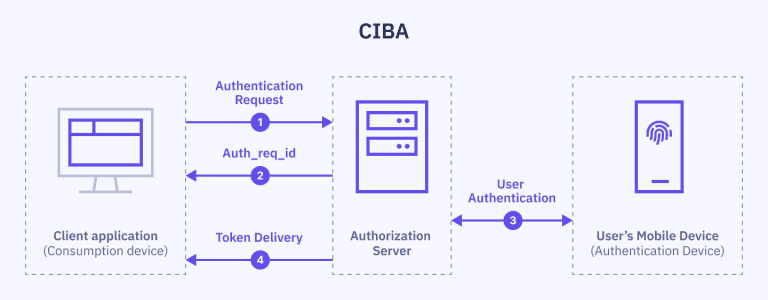
Caller Authentication is built on the Client-Initiated Backchannel Authentication (CIBA) flow.
With CIBA, the client application provides a hint (e.g. the user's SSN) that triggers an authentication request to the user's device. The user can then approve the request and complete the authentication process on their device.
The client application communicates directly with Idura Verify through a backend channel, without browser redirects. This allows authentication to be initiated on one device and completed on another, making CIBA a perfect fit for use cases where the end-user doesn’t operate the client application—such as a call center agent verifying a caller’s identity.
Authentication process with CIBA
-
User connection: A user is connected to, or waiting to speak with, a call center agent.
-
Start authentication: The client application sends a CIBA authentication request to the backchannel authentication endpoint of the OpenID Provider’s Authorization Server. This request includes client credentials, scopes, and a valid identifier of a user to be authenticated (e.g. SSN).
-
Receive authorization request identifier: Authorization Server responds with a unique
auth_req_idthat will be used to track the authentication process. -
User authentication: Authorization Server uses the provided user identifier to locate and prompt the user to authenticate on their authentication device.
-
Token issuance & delivery: Once the user successfully authenticates, Authorization Server creates an ID Token and Access Token.
Implementing Caller Authentication with CIBA
The CIBA flow is only available to traditional server-based web applications (confidential clients) and requires client validation for authentication requests.
We'll use private key JWTs for authentication in the example below. An alternative (less secure) approach is to use client_secret for authentication.
1. Start the authentication request
Make an HTTP POST request to the /ciba/bc-authorize endpoint:
# Replace `YOUR_DOMAIN.idura.broker` with your Idura domain
# Replace `$client_assertion` with your JWT assertion
# Replace `SSN` with a valid SSN

HTTP POST https://YOUR_DOMAIN.idura.broker/ciba/bc-authorize
Content-Type: application/x-www-form-urlencoded

scope=openid
&login_hint=sub:ssn:SSN
&acr_values=ACR_VALUE
&client_assertion_type=urn:ietf:params:oauth:client-assertion-type:jwt-bearer
&client_assertion=$client_assertion
# Add eID-specific parameters here
| eID Provider | Required Parameters | Notes |
|---|---|---|
| Swedish BankID |
|
The |
| Norwegian BankID | acr_values=urn:grn:authn:no:bankid | Do not include a binding_message: the BankID app handles this internally. |
2. Successful response
The response will be slightly different depending on the eID provider.
Note: If the interval value is returned in response, the client must use it as a polling
interval. Otherwise, the client must default to a 5 second polling interval.
Swedish BankID:
{
  "auth_req_id" : "3857f8ff-21b9-48ae-a732-a3bd8128a7ae",
  "expires_in" : 120
  "interval" : 3, // optional
}
The interval value can be included if the server specifies a polling interval.
Norwegian BankID:
{
  "auth_req_id" : "3857f8ff-21b9-48ae-a732-a3bd8128a7ae",
  "expires_in" : 900,
  "interval" : 3,
  "bindingMessage" : "Frekk julekos"
}
| eID Provider | Parameters | Notes |
|---|---|---|
| Norwegian BankID | bindingMessage | The BankID app displays a word
pair to
the user. Your IVR or call center agent must communicate the word pair provided in the
|
3. Poll the token endpoint
After receiving auth_req_id, poll the token endpoint (/oauth2/token) to get a response with an ID token.
# Replace `AUTH_REQ_ID` with the id returned by authentication response
# Replace `$client_assertion` with your JWT assertion

HTTP POST https://YOUR_DOMAIN.idura.broker/oauth2/token
Content-Type: application/x-www-form-urlencoded

auth_req_id=AUTH_REQ_ID
&grant_type=urn:openid:params:grant-type:ciba
&client_assertion_type=urn:ietf:params:oauth:client-assertion-type:jwt-bearer
&client_assertion=$client_assertion
Polling Frequency: The authentication process requires interacting multiple times with the
end-user, so the identification process may take some time.
Consequently, the token endpoint should be polled every 5 seconds OR, if the interval value was
returned as part of a successful authentication response, the client must respect it.
Token Delivery Modes: CIBA allows three token delivery methods: Poll, Ping and Push. Idura Verify only supports the Poll mode at the moment.
4. Polling results
On successful user identification, a token response is returned:
{
  token_type: 'Bearer',
  expires_in: '120',
  id_token: 'eyJ0eXAiOiJKV1QiLCJhbGciOiJSUzI1NiIsImtpZCI6IjgyN0Q5QTNFOTg2MTY0OTVBQzZGRTE3MUFFNkRBM0IzQ0ExNDE5MjEifQ.eyJpc3MiOiJodHRwczovL25hdGFsaWEtZGV2LXRlc3QuY3JpaXB0by5pbyIsImF1ZCI6InVybjpjaWJhIiwiaWRlbnRpdHlzY2hlbWUiOiJzZWJhbmtpZCIsImF1dGhlbnRpY2F0aW9udHlwZSI6InVybjpncm46YXV0aG46c2U6YmFua2lkIiwiYXV0aGVudGljYXRpb25tZXRob2QiOiJ1cm46b2FzaXM6bmFtZXM6dGM6U0FNTDoyLjA6YWM6Y2xhc3NlczpTb2Z0d2FyZVBLSSIsImF1dGhlbnRpY2F0aW9uaW5zdGFudCI6IjIwMjQtMDUtMjJUMTA6NDE6NDEuMzYxWiIsIm5hbWVpZGVudGlmaWVyIjoiYmI5YzIzNjRkZmFlNDRmM2JjZmQ5OTkwNTNkOTRmOWUiLCJzdWIiOiJ7YmI5YzIzNjQtZGZhZS00NGYzLWJjZmQtOTk5MDUzZDk0ZjllfSIsInNlc3Npb25pbmRleCI6ImI2NWYxMWI2LWViYTctNDg4Mi05MDBhLTVmMmQ5M2EzOGRiYSIsInNzbiI6IjE5NjgwMjAyMDU3NSIsIm5hbWUiOiJUZXJuZSBQYXVsc2VuIiwiZ2l2ZW5uYW1lIjoiVGVybmUiLCJnaXZlbl9uYW1lIjoiVGVybmUiLCJzdXJuYW1lIjoiUGF1bHNlbiIsImZhbWlseV9uYW1lIjoiUGF1bHNlbiIsImlwYWRkcmVzcyI6IjE4NS4xNTcuMTM0LjEzNCIsImNvdW50cnkiOiJTRSIsImlhdCI6MTcxNjM3NDUwMSwibmJmIjoxNzE2Mzc0NTAxLCJleHAiOjE3MTYzNzU3MDF9.RVQnlukfoH597uXzE1Gays5DElGzAr8xgOmi7ZWppaL3QPGhV4vK2o6qLhxXg_-FKG9xCwHR6gEhnNzWA3W3B6Q2zJeQTYh9okUvTmmhAFIyDL7lEtfWVVKUKvauDisYVZDjAxJQS_1zbgPEi5I-UJ6_kvMGH-wC13MAD2bZGTGR2dR-ZevBUn7plOt0PKXrIZD3vwxDfebTMPQqX_9SNT5F7GLjCcpeVK-T5LOgmUMFcTAbHvNyklqP5ymRHsZLDw_ib4I7ZqODhR-3uISWo1NvG4Y84iBcqv50WRNlmMUm004LfPw1flM5DNsVyUWCqYW8m7eBEwLp5va-6OQG4w',
  access_token: 'cf1ce646-7fbe-4740-9c56-fe3f0891f6c6'
}
Continue polling until the token endpoint returns a token response or an "access_denied" error.
While the authentication process is ongoing, the provider will always return "error": "authorization_pending".
The exact response format for intermediate authentication states depends on the eID provider.
Swedish BankID
| Description | Response |
|---|---|
| The user has not yet interacted with the BankID app. | |
| The user has been presented with a message requesting to confirm if they can acknowledge a request for identification. | |
| The user has acknowledged the request, but has not yet identified themselves. | |
| The user did not acknowledge that the identification request was warranted or canceled the request before identification was performed. | |
Norwegian BankID
| Description | Response |
|---|---|
| The user has not chosen the word pair yet. | |
| The user canceled or selected the wrong words. | |
Caller Authentication with Swedish BankID
BankID in telephone calls facilitates user authentication during a phone call.
How authentication works
- SSN input: The customer service agent enters the user's personal identification number (SSN) in their system, or the user is prompted to input their SSN via an automated PBX system.
- Authentication request: The customer service agent (if applicable) indicates whether the call was initiated by the user or the company they represent, then initiates an authentication request.
- Security check: The Swedish BankID app displays a phone icon and the company’s name, prompting the user with a Yes/No security check question.
- User response: If the user selects Yes, they can proceed by identifying themselves with a security code or biometrics. If the user selects No, they can cancel the identification process.
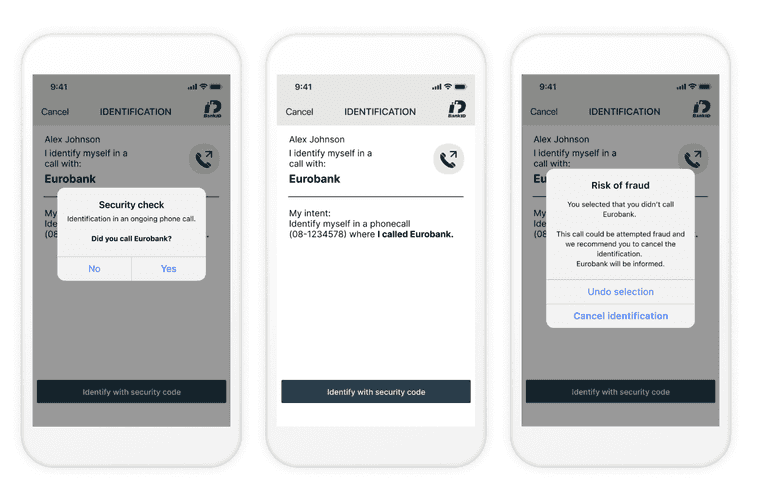
The example above demonstrates what it looks like when the customer is calling the service. A different security check is shown when the service is calling the customer.
Caller Authentication with Norwegian BankID
Caller Authentication enables identity verification during a live call or while the user is waiting in the call queue. The user authenticates in the BankID app using biometrics.
This product is currently in BETA. If you're interested in using it, please contact us at support@idura.eu.