
- eIDs
- Swedish BankID
- Getting Started
- eIDs
- Guides & Tools
- Articles
- Age Verification
- Authorize URL builder
- Caller Authentication with CIBA
- OIDC Visualizer
- Single Sign-on
- Creating test users
- Work with metadata
- App switching
- Choose language
- Custom styling
- Prefilled input fields
- Private key JWT authentication
- Pushed Authorization Requests (PAR)
- Get ready for production
- Telemetry & observability
- Integrations
- Reference
eIDs
Swedish BankID
Learn more about Swedish BankID token contents, how to create test users and how to gain access to production.
JWT/Token example
Optional claims for native BankID signature verification
If your use case requires verifying the signature (which is not required, but possible), you have an option to request the evidence data as returned by the underlying e-ID provider.
This can be done by adding scope=openid evidence (or login_hint=scope:evidence) to your authorize request.
With this configuration, the issued JWT will contain two additional claims: evidence and ocspResponse:
The full content of evidence and ocspResponse is omitted for brevity.
Avoiding excessively large JWT payload
When included in the payload, evidence and ocspResponse claims will significantly increase the size of the JWT token, potentially causing it to exceed the size limitations of an HTTP header. The bloated JWTs would thus become unusable as Bearer tokens for accessing APIs.
To address this concern, consider changing the response type in your authorization request to response_type=code id_token.
In this case, a more compact ID Token with only essential claims will be issued from the Token endpoint. The client can subsequently fetch all data about the user from the Userinfo endpoint.
_ With code id_token response type, the ID Token from the token endpoint will always be the same (and have nothing but a sub that is user-specific). In contrast, when using the response_type=code, the full ID Token is returned immediately in exchange for code._
Test users
Swedish BankID test users are created at the Demo Bank web site.
For more information on how to configure your device for test and setup test users, see BankID for test. Follow the steps outlined in the guide:
- Download the app/program.
- Configure the client for test.
- Get a BankID for test. If you already have a fully-configured production or test BankID, you can use it to create a test user. Otherwise, see below on how to bootstrap the process.
Get a BankID for test (without an existing production/test BankID)
Log in at the Demo bank website with a Personal code option. The code will be sent to you by email.
Once logged in, create a test user by selecting Mobile BankID or BankID on file (for desktop version) option under Issue BankID for test. Please note that a test user must be created with a valid Swedish personal identity number ("Personnummer"). You can generate a valid Personnummer using one of the available online tools, such as this generator. After creating a test user, you will be able to link it to the mobile or desktop version of the test app.
For future test user issuances, you can log in using an already-issued BankID test user by selecting the Test BankID option during login.
Note that, as is also described on the website, using test BankID users does require a reconfiguration of the BankID application. This means it cannot be used for real BankID. So if you are Swedish and already have BankID on your phone, you may want to use a spare phone for testing.
BankID Phone Authentication
BankID in telephone calls facilitates user authentication during a phone call.
For details and integration instructions, please refer to Caller Authentication with CIBA.
BankID Headless Authentication
Overview
Headless authentication is designed for flows where you want maximum control over how user interacts with same device and QR flows for BankID.
For instance you could render the QR flow in your own website, or trigger app2app in your native app without having to open a browser
The underlying Headless flow
Idura Verify facilitates Swedish BankID headless authentication via the Headless flow.
Implementing BankID Headless Authentication
The Headless flow is only available to traditional server-based web applications (confidential clients) and requires client validation for authentication requests. We'll use private key JWTs for authentication in the example below. An alternative (less secure) approach is to use client_secret for authentication.
HTTP POSTrequest to the/headless/authorizeendpoint:
# Replace `$client_assertion` with your JWT assertion
# Replace `YOUR_DOMAIN.idura.broker` with your Idura domain

HTTP POST https://YOUR_DOMAIN.idura.broker/headless/authorize
Content-Type: application/x-www-form-urlencoded

scope=openid
&end_user_ip=127.0.0.1
&acr_values=urn:grn:authn:se:bankid
&client_assertion_type=urn:ietf:params:oauth:client-assertion-type:jwt-bearer
&client_assertion=$client_assertion
- A successful response will look something like this:
{
  "headless_req_id" : "3857f8ff-21b9-48ae-a732-a3bd8128a7ae",
  "expires_in" : 120,
  "acr_data": {
    "qrData": "bankid.5367b735-a3f9-47d9-aafc-6d2ad5a14901.0.425c66c472e756fc6a070b86eef1adb4fac0a2714d828c902afa77a5b15e8590",
    "autoStartToken": "d2c96ea2-f8d9-4e9f-8d39-4f2e88e10e1c"
  }
}
- Poll the token endpoint (
/oauth2/token) to get a response with an ID token. Theheadless_req_idis used to construct a poll request on the token endpoint:
# Replace `HEADLESS_REQ_ID` with the id returned by authentication response
# Replace `$client_assertion` with your JWT assertion

HTTP POST https://YOUR_DOMAIN.idura.broker/oauth2/token
Content-Type: application/x-www-form-urlencoded

headless_req_id=HEADLESS_REQ_ID
&grant_type=urn:urn:params:grant-type:headless
&client_assertion_type=urn:ietf:params:oauth:client-assertion-type:jwt-bearer
&client_assertion=$client_assertion
Polling Frequency: Bear in mind, that the authentication process requires interacting multiple times with the end-user, so the identification process could take some time. Consequently, the token endpoint should be polled every 5 seconds.
- The result of a poll request will depend on the state of the process:
On successful user identification, a successful token response is returned, e.g.:
{
  token_type: 'Bearer',
  expires_in: '120',
  id_token: 'eyJ0eXAiOiJKV1QiLCJhbGciOiJSUzI1NiIsImtpZCI6IjgyN0Q5QTNFOTg2MTY0OTVBQzZGRTE3MUFFNkRBM0IzQ0ExNDE5MjEifQ.eyJpc3MiOiJodHRwczovL25hdGFsaWEtZGV2LXRlc3QuY3JpaXB0by5pbyIsImF1ZCI6InVybjpjaWJhIiwiaWRlbnRpdHlzY2hlbWUiOiJzZWJhbmtpZCIsImF1dGhlbnRpY2F0aW9udHlwZSI6InVybjpncm46YXV0aG46c2U6YmFua2lkIiwiYXV0aGVudGljYXRpb25tZXRob2QiOiJ1cm46b2FzaXM6bmFtZXM6dGM6U0FNTDoyLjA6YWM6Y2xhc3NlczpTb2Z0d2FyZVBLSSIsImF1dGhlbnRpY2F0aW9uaW5zdGFudCI6IjIwMjQtMDUtMjJUMTA6NDE6NDEuMzYxWiIsIm5hbWVpZGVudGlmaWVyIjoiYmI5YzIzNjRkZmFlNDRmM2JjZmQ5OTkwNTNkOTRmOWUiLCJzdWIiOiJ7YmI5YzIzNjQtZGZhZS00NGYzLWJjZmQtOTk5MDUzZDk0ZjllfSIsInNlc3Npb25pbmRleCI6ImI2NWYxMWI2LWViYTctNDg4Mi05MDBhLTVmMmQ5M2EzOGRiYSIsInNzbiI6IjE5NjgwMjAyMDU3NSIsIm5hbWUiOiJUZXJuZSBQYXVsc2VuIiwiZ2l2ZW5uYW1lIjoiVGVybmUiLCJnaXZlbl9uYW1lIjoiVGVybmUiLCJzdXJuYW1lIjoiUGF1bHNlbiIsImZhbWlseV9uYW1lIjoiUGF1bHNlbiIsImlwYWRkcmVzcyI6IjE4NS4xNTcuMTM0LjEzNCIsImNvdW50cnkiOiJTRSIsImlhdCI6MTcxNjM3NDUwMSwibmJmIjoxNzE2Mzc0NTAxLCJleHAiOjE3MTYzNzU3MDF9.RVQnlukfoH597uXzE1Gays5DElGzAr8xgOmi7ZWppaL3QPGhV4vK2o6qLhxXg_-FKG9xCwHR6gEhnNzWA3W3B6Q2zJeQTYh9okUvTmmhAFIyDL7lEtfWVVKUKvauDisYVZDjAxJQS_1zbgPEi5I-UJ6_kvMGH-wC13MAD2bZGTGR2dR-ZevBUn7plOt0PKXrIZD3vwxDfebTMPQqX_9SNT5F7GLjCcpeVK-T5LOgmUMFcTAbHvNyklqP5ymRHsZLDw_ib4I7ZqODhR-3uISWo1NvG4Y84iBcqv50WRNlmMUm004LfPw1flM5DNsVyUWCqYW8m7eBEwLp5va-6OQG4w',
  access_token: 'cf1ce646-7fbe-4740-9c56-fe3f0891f6c6'
}
The user has not yet completed the authentication, acr_data.hintCode provides details as to how far they are in the process.:
HTTP/1.1 400 Bad Request
{
  "error": "authorization_pending",
  "error_description": "awaiting first user interaction",
  "acr_data": {
    "qrData": "bankid.5367b735-a3f9-47d9-aafc-6d2ad5a14901.0.425c66c472e756fc6a070b86eef1adb4fac0a2714d828c902afa77a5b15e8590",
    "hintCode": "...."
  }
}
The user did not acknowledge that the identification request warranted or canceled the request before identification was performed:
HTTP/1.1 400 Bad Request
{
  "error": "access_denied",
  "error_description": "user declined"
}
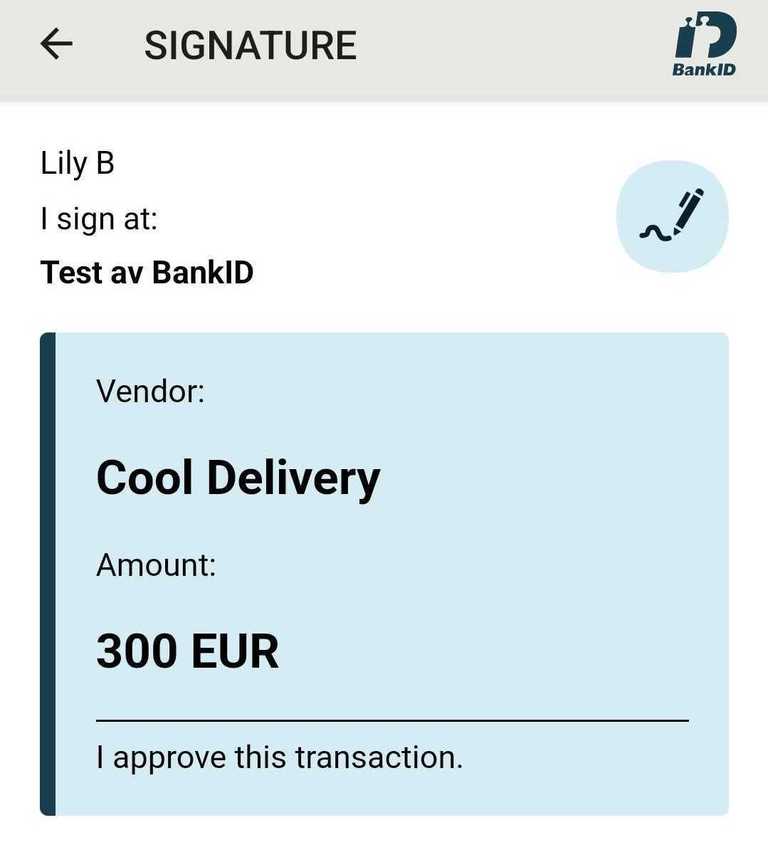
Signing text/markdown
Swedish BankID supports signing text and markdown.
Text signing is triggered by using the action and message parameters via login_hint.
- The
actionparameter must be set tosign - The
messageparameter must be base64 encoded and at most 40,000 characters after base64 encoding. - The
messageparameter supports markdown text.
Note: Signing produces very large JWTs that are not appropriate for authentication/Bearer header use
Text signing has a different eID cost than authentication. If you have questions, please contact sales.
Example
login_hint=action:sign message:VmVuZG9yOgoKIyMgQ29vbCBEZWxpdmVyeQoKQW1vdW50OgoKIyMgMzAwIEVVUgoKLS0tCgpJIGFwcHJvdmUgdGhpcyB0cmFuc2FjdGlvbi4=
Try out the example in our URL builder
Round-tripping data that is not visible to the end user
Swedish BankID allows you to send data along in both authentication and signature flows,
which they will then embed in the evidence claim after a flow completes succesfully.
You can supply this value via a nonVisibleData parameter in the login_hint.
The supplied value must be base64 encoded.
Idura does not attempt to parse or validate the value, we only pass on what is given to the native provider API.
Example
login_hint=nonVisibleData:bm90IHZpc2libGUgdG8gZW5kIHVzZXJzLCBhY2Nlc3NpYmxlIGluIHRoZSBgZXZpZGVuY2VgIGNsYWltIGFmdGVyIGEgZmxvdyBjb21wbGV0ZXMgc3VjY2VzZnVsbHk=
Try out the example in our URL builder
Ordering Swedish BankID
To start accepting real users with Swedish BankID, you must first request a certificate to identify your organization.
Idura acts as a reseller for Swedbank, which means that you will have to go through a simple approval process with Swedbank. The process is managed by Idura.
To order the actual certificate, simply download this form and return a filled-out copy to orders@idura.eu along with your tenant support link.
Next steps
After Idura has received the filled out form, we send it to Swedbank where it will be reviewed and approved. The whole process typically takes up to 10 business days.
Once your organization and your intended use of BankID has been approved, we will create and install the actual certificate in your Idura tenant. You will then be ready to proceed with the steps outlined in the Getting ready for production guide.